Snapchat remains one of the most popular social media apps worldwide, with millions of users sharing snaps daily. According to recent reports, Snapchat has over 800 million monthly active users, and many people use the Best Friends feature every day. However, some users prefer more privacy and want better control over their friend list. That is why many people search for ways to remove Best Friends from Snapchat without deleting their accounts.
Although Snapchat automatically creates the Best Friends list based on interaction frequency, users can still influence or reset it. In addition, understanding how Snapchat tracks interactions helps you manage your profile more effectively. This guide explains practical methods that work on both Android and iPhone devices. Moreover, you will learn how to hide, replace, or reset Best Friends without confusion.
What Does Best Friends Mean On Snapchat?
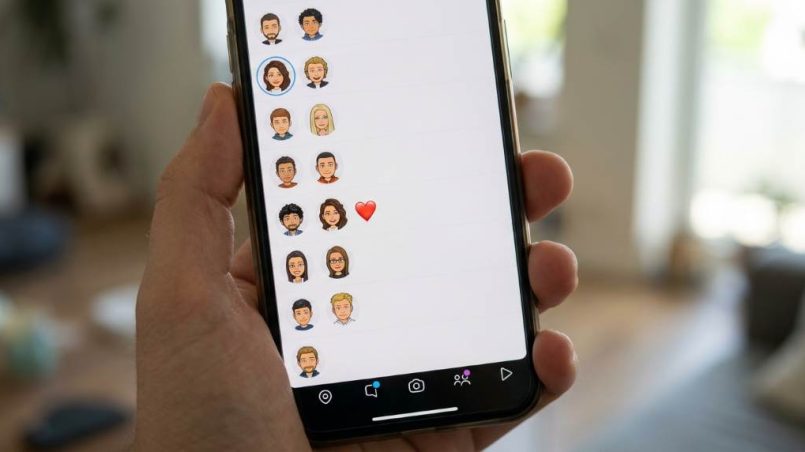
Snapchat uses the Best Friends feature to show the people you interact with most often. The app tracks snaps, chats, streaks, and overall communication frequency. As a result, the users you contact regularly appear near the top of your chat section. Snapchat also assigns emojis to indicate friendship levels.
Many users enjoy this feature because it makes chatting faster and easier. However, others dislike the visibility of close interactions. Sometimes users want more privacy, while others simply want to organize their account differently. Therefore, learning how to control the Best Friends list becomes important.
Can You Directly Remove Best Friends On Snapchat?
Snapchat does not provide a direct button to remove someone from the Best Friends section. Instead, the app updates the list automatically according to your activity patterns. Because of this system, users must change interaction habits to influence the list. Fortunately, several methods can help achieve that goal.
You do not need advanced technical knowledge to manage your Best Friends list. In fact, most solutions take only a few minutes. Furthermore, these methods work without violating Snapchat rules or risking account suspension. That makes them safe and practical for everyday users.
Stop Interacting With The Person
The easiest method involves reducing communication with the person you want to remove. Snapchat updates Best Friends rankings based on recent interactions rather than old activity. Therefore, decreasing snaps and chats gradually lowers their ranking. Eventually, another active contact replaces them.
You should avoid sending direct snaps, voice notes, and messages for several days. In addition, avoid reacting to stories or maintaining long chat streaks. The app usually refreshes rankings within a week depending on your activity level. Consequently, this method works naturally and safely.
Tips To Reduce Interaction Faster
- Stop sending photo snaps daily
- Avoid replying instantly to chats
- End long Snapchat streaks
- Reduce story reactions
- Focus communication on other friends
These actions help Snapchat recalculate your interaction patterns more quickly. As a result, the unwanted person may disappear from the Best Friends section sooner.
Increase Interaction With Other Friends
Another effective strategy involves increasing communication with different users. Since Snapchat limits the number of Best Friends displayed, new active contacts can replace older ones. Therefore, talking more with other people changes the ranking naturally. This method works especially well for active Snapchat users.
You can send snaps to group chats or close friends more frequently. Moreover, starting daily conversations with other contacts helps speed up the process. Snapchat notices recent engagement trends quickly. Consequently, your Best Friends list updates over time without manual removal.
Best Activities To Boost Other Friend Rankings
- Share daily selfies with friends
- Send voice messages regularly
- Start group conversations
- Maintain streaks with different people
- React to other users’ stories often
Consistent interaction with multiple users creates stronger ranking changes. Therefore, Snapchat eventually pushes less active contacts lower on the list.
Remove The Friend Completely
If you want a faster solution, removing the person from your friend list works immediately. Snapchat stops tracking Best Friend interactions once the friendship ends. As a result, the user disappears from your Best Friends section. However, this method may affect your social connection with that person.
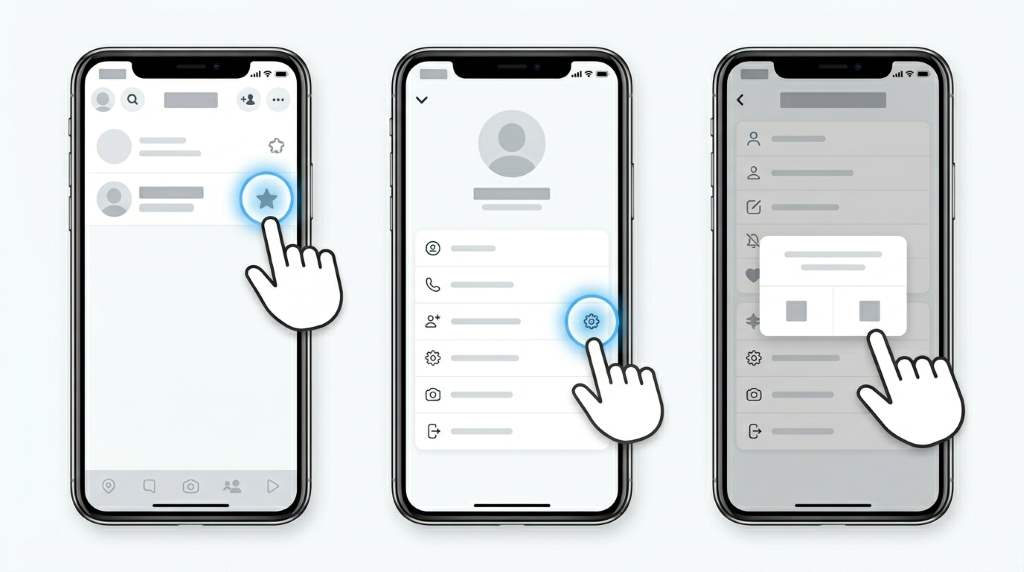
To remove a friend, open the user’s profile and tap the menu icon. Then select “Manage Friendship” followed by “Remove Friend.” Snapchat does not send a notification about the removal. Therefore, the process remains relatively private.
Steps To Remove A Friend On Snapchat
- Open Snapchat
- Go to the Chat section
- Tap the friend’s Bitmoji
- Select the three-dot menu
- Choose “Manage Friendship”
- Tap “Remove Friend”
After removal, Snapchat clears interaction rankings connected to that user. Consequently, they disappear from the Best Friends category immediately.
Block The Person Temporarily
Blocking someone offers another quick solution for removing them from Best Friends. When you block a user, Snapchat removes all active interactions temporarily. Therefore, the ranking system resets your connection level with that person. Later, you can unblock them if needed.
This method works well when you want a temporary break without permanently ending communication. However, blocking also removes chat history in many cases. Because of that, you should save important messages beforehand. Additionally, remember that the other person may notice the block indirectly.
How To Block Someone On Snapchat
- Open the user’s profile
- Tap the three-dot menu
- Select “Manage Friendship”
- Choose “Block”
After blocking, wait several days before unblocking if you want stronger ranking changes. Consequently, Snapchat often replaces that user in your Best Friends list.
Clear Conversations To Reduce Interaction Signals
Snapchat uses interaction patterns to calculate friendship rankings. Therefore, clearing conversations may slightly reduce visible engagement signals. Although this method alone may not fully remove someone, it helps when combined with reduced communication. Furthermore, it keeps your chat section cleaner.
To clear a conversation, open Snapchat settings and navigate to “Clear Conversations.” Then tap the “X” beside the selected friend. The chat disappears from your feed, although saved messages remain available. As a result, your account feels more organized.
Benefits Of Clearing Conversations
- Reduces visible chat activity
- Organizes your inbox
- Helps reset communication habits
- Improves privacy
- Supports ranking adjustments
While this approach works gradually, combining it with reduced interaction creates better results.
Understand Snapchat Best Friends Emojis
Snapchat uses emojis to indicate friendship status and interaction levels. Therefore, understanding these symbols helps users monitor changes effectively. For example, the yellow heart means you are each other’s number one Best Friend. Meanwhile, the red heart indicates consistent top interaction for two weeks.
Some users panic when emojis disappear unexpectedly. However, this usually happens because interaction patterns changed naturally. In addition, Snapchat updates emojis automatically based on communication frequency. Consequently, you can influence them by adjusting your activity.
Common Snapchat Friend Emojis
| Emoji | Meaning |
|---|---|
| 💛 | Best Friends |
| ❤️ | Best Friends for two weeks |
| 💕 | Best Friends for two months |
| 😊 | Close friend |
| 😎 | Mutual Best Friend |
Understanding these emojis makes it easier to track your progress while adjusting your Best Friends list.
Does Snapchat Notify Users About Best Friend Changes?
Snapchat does not notify users when they disappear from your Best Friends list. Therefore, you can manage your rankings privately without direct alerts. However, users may notice missing emojis or reduced interaction visibility over time. Still, Snapchat keeps most ranking changes discreet.
This privacy approach helps users organize their social experience more comfortably. Moreover, it reduces awkward conversations caused by automatic friendship rankings. Consequently, users can control their accounts with greater confidence.
Related:
The Extraordinary Power Of An Experienced Digital Marketing Agency
When Creating a Crisis Management Plan for Social Media, What Element Should You Start With?
How Long Does It Take To Remove Someone From Best Friends?
The timing depends on your activity level and communication habits. In most cases, Snapchat updates rankings within a few days to one week. However, highly active users may notice changes faster. Meanwhile, less active accounts often require more time.
Consistent behavioral changes produce better results than one-time actions. Therefore, users should maintain reduced interaction patterns for several days. In addition, increasing communication with other contacts speeds up the replacement process. Consequently, patience plays an important role.
Common Mistakes Users Make
Many users expect an instant removal button inside Snapchat settings. Unfortunately, Snapchat does not currently offer that option. Therefore, frustration often comes from unrealistic expectations. Understanding the platform’s automatic ranking system prevents confusion.
Another common mistake involves continuing frequent interaction after trying removal methods. Snapchat quickly rebuilds Best Friend rankings through ongoing chats and snaps. As a result, inconsistent behavior delays changes significantly. Consequently, users should stay consistent for better outcomes.
Mistakes To Avoid
- Sending daily snaps accidentally
- Keeping long streaks active
- Blocking and unblocking too quickly
- Expecting instant results
- Ignoring interaction frequency with others
Avoiding these mistakes improves your chances of changing the Best Friends list successfully.
Privacy Tips For Snapchat Users
Managing Snapchat privacy goes beyond controlling Best Friends. Users should also review story visibility, location sharing, and messaging permissions regularly. Therefore, taking a complete privacy approach improves overall account security. In addition, privacy settings help reduce unwanted attention.
Snapchat users in humid and high-activity regions often spend more indoor screen time during hot weather seasons. As a result, social app usage increases significantly during summer months. Therefore, organizing friend lists and privacy settings becomes even more useful for frequent users. Consistent account management creates a safer online experience.
Important Snapchat Privacy Settings
- Enable Ghost Mode on Snap Map
- Limit who can contact you
- Restrict story viewers
- Review friend list regularly
- Turn off quick add visibility
These settings improve control over your Snapchat experience while supporting better privacy management.
Should You Delete Your Snapchat Account?
Deleting your Snapchat account should remain the last option. Most users can solve Best Friends concerns using the methods above. In addition, deleting an account removes memories, streaks, and saved content permanently after the recovery period. Therefore, smaller adjustments usually work better.
If privacy remains your main concern, focus on interaction control and friend management first. Moreover, Snapchat continues updating privacy tools regularly. Consequently, users now have more options than before without abandoning the platform completely.
Conclusion
Learning how to remove Best Friends from Snapchat becomes much easier once you understand how the ranking system works. Although Snapchat does not offer a direct removal button, several practical methods help manage the list effectively. Reducing interactions, increasing communication with others, blocking temporarily, or removing friends all produce results over time. Furthermore, privacy settings help improve your overall Snapchat experience.
Take a few minutes today to review your Snapchat interactions and adjust your friend list strategically. Consistent activity changes deliver the best results without creating unnecessary drama. In addition, maintaining better privacy habits helps protect your social experience long term. Start using these methods now to gain more control over your Snapchat account.
FAQs
Can I manually remove someone from Snapchat Best Friends?
No, Snapchat updates Best Friends automatically based on interaction frequency.
How fast does Snapchat update Best Friends?
Most changes happen within a few days to one week depending on activity.
Will someone know if I remove them from Best Friends?
Snapchat does not directly notify users about Best Friends changes.
Does blocking someone remove them from Best Friends?
Yes, blocking someone immediately removes active interaction rankings.
Can deleted chats affect Best Friends rankings?
Clearing chats may help slightly, especially when combined with reduced interaction.