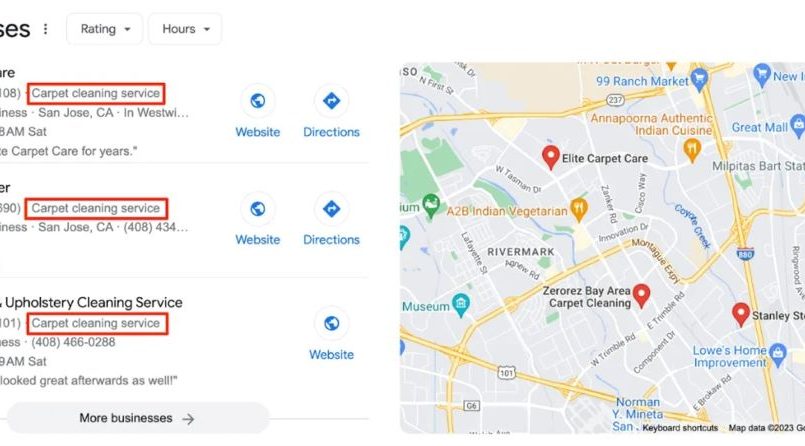
California’s competitive business landscape demands more than just a physical storefront or a well-designed website. With over 4 million small businesses and a population that relies heavily on digital discovery, ranking high on Google Maps can make or break your local success. In 2026, a staggering 85% of Californians use Google Maps to find local businesses, and 60% of these searches result in a purchase within 24 hours. To rank local businesses on Google Maps in California, you need a strategic approach that combines optimization, engagement, and consistency. This guide explores proven local SEO California strategies to help you climb the rankings, attract more customers, and dominate your local market.
Why Google Maps Ranking in California Matters
California’s diverse and tech-savvy population turns to Google Maps for everything from finding a nearby coffee shop to locating a trusted plumber. A 2025 report by the California Small Business Association found that businesses appearing in the top 3 Google Maps results receive 70% of all local search clicks. This visibility translates directly into foot traffic, phone calls, and revenue.
Additionally, Google Maps rankings are closely tied to Google’s local search algorithm, which prioritizes businesses that demonstrate relevance, distance, and prominence. Therefore, optimizing for Google Maps is not just about appearing on the map—it’s about ensuring your business stands out in a crowded and competitive market like California.
Key Strategies to Rank Business on Google Maps in California
1. Claim and Optimize Your Google Business Profile
Your Google Business Profile (formerly Google My Business) is the cornerstone of your Google Maps ranking in California. Claiming and optimizing this profile ensures that Google has accurate and up-to-date information about your business. Start by visiting Google Business Profile and claiming your listing. If your business isn’t listed, create a new profile.
Once claimed, fill out every section of your profile completely and accurately. This includes:
- Business Name: Use your exact, legal business name. Avoid adding keywords or locations to your name, as this violates Google’s guidelines.
- Address: Ensure your address is accurate and consistent with other online directories. If you serve customers at their locations (e.g., a plumbing service), specify your service area.
- Phone Number: Use a local phone number with a California area code. Avoid using toll-free numbers.
- Website URL: Include a link to your website. Ensure the URL is correct and directs users to a relevant page.
- Business Category: Choose the most specific category that describes your business. For example, instead of “Restaurant,” select “Italian Restaurant” or “Vegetarian Restaurant.”
- Business Hours: List your accurate operating hours, including special hours for holidays or events. Keep this information updated to avoid frustrating potential customers.
- Business Description: Write a compelling, keyword-rich description of your business. Highlight what makes your business unique and include relevant keywords like “local SEO California” or “rank business maps.”
Additionally, add high-quality photos of your business, including the exterior, interior, products, services, and team. Businesses with photos receive 42% more requests for directions and 35% more website clicks, according to Google.
2. Ensure NAP Consistency Across All Directories
NAP (Name, Address, Phone Number) consistency is critical for ranking local businesses on Google Maps in California. Inconsistencies in your business information across online directories can confuse Google’s algorithm and harm your rankings. Ensure your NAP is identical on your Google Business Profile, website, social media profiles, and other online directories like Yelp, Yellow Pages, and Facebook.
Use a tool like Moz Local or BrightLocal to scan the web for inconsistencies and correct them. Additionally, claim and optimize your listings on major directories to improve your online visibility and credibility.
3. Encourage and Respond to Customer Reviews
Customer reviews are a major ranking factor for Google Maps. Businesses with a high volume of positive reviews are more likely to rank higher in local search results. Encourage your customers to leave reviews by:
- Asking in Person: Train your staff to politely ask satisfied customers to leave a review.
- Email or Text Requests: Send a follow-up email or text message after a purchase or service, including a direct link to your Google Business Profile review page.
- Social Media: Share a post on your social media channels asking followers to leave a review.
- In-Store Signage: Place signs or stickers in your store with a QR code that links to your review page.
Additionally, respond to all reviews—both positive and negative—in a professional and timely manner. Thank customers for positive reviews and address concerns raised in negative reviews. This shows Google and potential customers that you value feedback and are committed to customer satisfaction.
4. Use Local Keywords in Your Content
Local keywords help Google understand the geographic relevance of your business. Incorporate location-specific keywords into your Google Business Profile description, website content, and other online listings. For example, a bakery in San Francisco might use keywords like “best sourdough bread in San Francisco” or “artisan pastries near me.”
Use tools like Google Keyword Planner or Ubersuggest to research relevant local keywords. Additionally, include these keywords in your website’s meta titles, descriptions, headers, and blog content to improve your local SEO California efforts.
5. Build High-Quality Local Backlinks
Backlinks from reputable local websites signal to Google that your business is trustworthy and relevant. Focus on earning backlinks from local directories, news sites, blogs, and industry associations. For example:
- Local Directories: Ensure your business is listed in local directories like the California Chamber of Commerce or city-specific business listings.
- Local News and Blogs: Reach out to local journalists or bloggers for features, interviews, or guest posts. For example, a restaurant in Los Angeles might be featured in a local food blog’s “Best New Eateries” list.
- Sponsorships and Partnerships: Sponsor local events, sports teams, or charities. These organizations often link to their sponsors’ websites, providing valuable backlinks.
Avoid low-quality or spammy backlinks, as they can harm your rankings. Focus on building relationships with other local businesses and organizations to earn natural, high-quality links.
6. Optimize for Mobile and Voice Search
With over 60% of local searches in California coming from mobile devices, a mobile-friendly website is essential for ranking on Google Maps. Ensure your website is responsive, loads quickly, and offers a seamless user experience on all devices. Use Google’s Mobile-Friendly Test to identify and fix issues that could hinder mobile users.
Additionally, optimize for voice search, which is growing rapidly in tech-savvy states like California. Voice searches often use natural language and long-tail keywords. For example, instead of targeting “best coffee shop in San Diego,” consider “Where can I find the best coffee shop in San Diego?” Use schema markup to help Google understand your content and improve your chances of appearing in voice search results.
7. Leverage Google Posts and Updates
Google Posts allow you to share updates, promotions, events, and other content directly on your Google Business Profile. These posts appear in your business listing and can help you engage with customers and improve your visibility. Use Google Posts to:
- Announce Special Offers: Share discounts, sales, or limited-time promotions.
- Highlight Events: Promote upcoming events, workshops, or webinars.
- Showcase Products or Services: Feature new products, services, or customer testimonials.
- Share Updates: Post about changes in hours, new locations, or other important news.
Additionally, use Google’s Q&A feature to answer common questions about your business. This not only provides valuable information to potential customers but also signals to Google that your business is active and engaged.
Professional Tips to Rank Businesses on Maps in California
Tip 1: Use Google Maps’ “Follow” Feature
Encourage your customers to follow your business on Google Maps. This feature allows users to receive updates and recommendations from your business, increasing engagement and visibility. Promote the “Follow” button on your website, social media, or in-store signage.
Tip 2: Add Attributes to Your Google Business Profile
Attributes provide additional details about your business, such as “women-led,” “outdoor seating,” or “free Wi-Fi.” These attributes help customers find businesses that meet their specific needs and preferences. Regularly update your attributes to reflect any changes in your offerings.
Tip 3: Monitor and Analyze Your Performance
Use Google’s built-in analytics tools to track your business’s performance on Google Maps. The Insights tab in your Google Business Profile provides data on:
- Search Queries: The keywords customers use to find your business.
- Customer Actions: How customers interact with your listing (e.g., website clicks, direction requests, phone calls).
- Photo Views: The number of times your photos are viewed.
- Peak Times: The busiest times for your business, based on foot traffic or calls.
Use this data to refine your local SEO California strategy and identify areas for improvement. For example, if you notice that many customers find your business using a specific keyword, incorporate that keyword more prominently into your content.
Tip 4: Create Local Content
Publishing localized content on your website or blog can improve your Google Maps ranking in California. Write about topics that are relevant to your local audience, such as:
- Local Events: Share information about community events, festivals, or workshops.
- Local News: Comment on local news or trends that relate to your industry.
- Customer Stories: Feature stories or testimonials from local customers.
- Local Guides: Create guides or lists related to your area, such as “Top 10 Things to Do in Sacramento” or “Best Hiking Trails in Orange County.”
This content not only attracts local traffic but also signals to Google that your business is deeply connected to the community.
Tip 5: Use Local Structured Data Markup
Structured data markup helps Google understand the context of your website’s content. Use local business schema markup to provide Google with detailed information about your business, such as your address, phone number, hours, and customer reviews. This can improve your chances of appearing in rich snippets and local search results.
Use Google’s Structured Data Markup Helper to generate and implement schema markup on your website. Focus on markup types relevant to your business, such as LocalBusiness, Restaurant, or Store.
Reviews: Success Stories from California Businesses
Businesses across California have achieved remarkable results by optimizing their Google Maps rankings. A family-owned restaurant in San Francisco climbed to the top of Google Maps results by claiming and optimizing its Google Business Profile, encouraging customer reviews, and publishing localized content. As a result, the restaurant saw a 50% increase in foot traffic and a 30% boost in revenue.
Meanwhile, a plumbing service in Los Angeles improved its Google Maps ranking by ensuring NAP consistency, building local backlinks, and responding to customer reviews. The business now appears in the top 3 results for keywords like “emergency plumber Los Angeles” and has doubled its customer base.
Another example is a boutique in San Diego that used Google Posts and Updates to engage with customers and promote its latest collections. By regularly sharing updates and responding to Q&As, the boutique increased its visibility on Google Maps and attracted more local shoppers.
Google Business Profile: Advanced Optimization Techniques
1. Add a Virtual Tour
A virtual tour of your business can provide potential customers with an immersive experience, increasing engagement and trust. Use Google’s Street View app to create a 360-degree tour of your business’s interior and exterior. This feature is particularly valuable for businesses like hotels, restaurants, and retail stores.
2. Use High-Quality Videos
Videos can showcase your business in action and provide a more dynamic view of your offerings. Upload short, high-quality videos to your Google Business Profile to highlight your products, services, or team. For example, a gym in Sacramento might share a video tour of its facilities or a clip of a popular fitness class.
3. Enable Messaging
Google Business Profile allows customers to message your business directly through the listing. Enable this feature to provide a convenient way for customers to ask questions, book appointments, or request quotes. Respond promptly to messages to improve customer satisfaction and engagement.
4. Use the Booking Button
If your business offers appointments or reservations, use the booking button on your Google Business Profile. This allows customers to book directly from your listing, streamlining the process and reducing friction. Integrate with scheduling tools like Calendly, Square Appointments, or Mindbody to manage bookings efficiently.
5. Post Regularly
Consistency is key when it comes to Google Posts. Aim to post at least once a week to keep your audience engaged and your listing active. Use a mix of post types, such as offers, events, updates, and product highlights, to maintain variety and interest.
FAQs About Ranking Local Businesses on Google Maps in California
1. How long does it take to rank on Google Maps in California?
The time it takes to rank on Google Maps varies depending on factors like competition, the completeness of your Google Business Profile, and the quality of your local SEO efforts. Generally, you can expect to see improvements within 4-8 weeks of implementing optimization strategies.
2. What are the most important ranking factors for Google Maps?
The most important ranking factors for Google Maps include the completeness and accuracy of your Google Business Profile, customer reviews, NAP consistency, local keywords, backlinks, and user engagement (e.g., clicks, calls, and direction requests).
3. How do I improve my Google Business Profile ranking?
To improve your Google Business Profile ranking, claim and optimize your profile, ensure NAP consistency, encourage and respond to customer reviews, use local keywords, build high-quality backlinks, and leverage Google Posts and Updates. Additionally, monitor your performance and adapt your strategy as needed.
4. Can I rank on Google Maps without a physical storefront?
Yes, service-area businesses (SABs) like plumbers, electricians, or cleaning services can rank on Google Maps without a physical storefront. Specify your service area in your Google Business Profile and ensure your NAP information is consistent across all directories.
5. How do I handle negative reviews on Google Maps?
Respond to negative reviews professionally and promptly. Address the customer’s concerns, apologize if necessary, and offer a solution or invitation to discuss the issue further offline. This shows potential customers that you value feedback and are committed to resolving problems.
6. What is the impact of photos on Google Maps rankings?
Photos can significantly impact your Google Maps rankings by increasing engagement and providing visual context for your business. Businesses with high-quality photos receive more clicks, direction requests, and website visits, which can improve their rankings.
7. How do I track my Google Maps ranking?
Use tools like Google’s Insights tab in your Google Business Profile, Moz Local, or BrightLocal to track your ranking, customer actions, and other performance metrics. Additionally, manually search for your business on Google Maps to monitor its position for relevant keywords.
Related Topics:
Conclusion
Ranking local businesses on Google Maps in California requires a strategic, multi-faceted approach. By claiming and optimizing your Google Business Profile, ensuring NAP consistency, encouraging customer reviews, using local keywords, building backlinks, and leveraging advanced features like Google Posts and Updates, you can improve your visibility and attract more customers. The professional tips and success stories in this guide provide a roadmap to help you dominate your local market.
California’s competitive business landscape demands continuous effort and adaptation. Start by auditing your current Google Business Profile and identifying areas for improvement. Implement the strategies discussed here, and monitor your performance using Google’s Insights and other analytics tools.
Don’t let a low Google Maps ranking hold your business back. With the right approach, you can rank local businesses on Google Maps in California and unlock new opportunities for growth. Take the first step today by claiming your Google Business Profile, encouraging customer reviews, or optimizing your listing with local keywords. Your future customers are searching for you—make sure they can find you.